

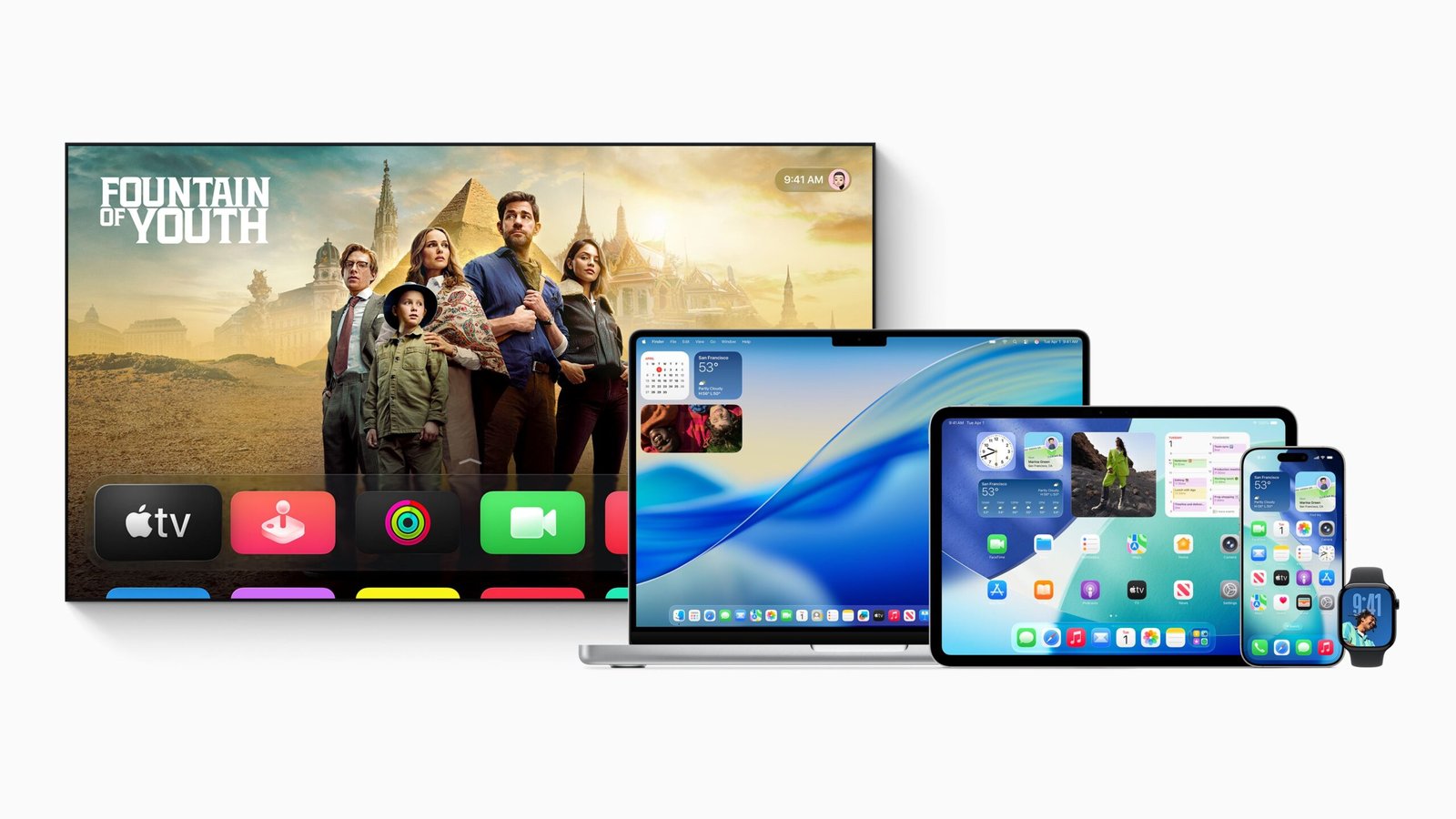

It’s that time of year again, as Apple unveils a first look at the future of its software at its Worldwide Developers Conference (WWDC). This time, users around the world are either excited or feeling a bit of apprehension, as the company rolls out its biggest design overhaul in years.
Apple’s new software design with “Liquid Glass” is described by CEO Tim Cook as “Expressive. Delightful. But still instantly familiar.”
Liquid Glass is a translucent, adaptive material that responds to light, motion, and context. It works on everything from small UI elements to system-wide features like the Lock Screen and Control Center. Redesigned controls, toolbars, and navigation elements adjust dynamically to user interaction, creating a more fluid and intuitive experience.
The design spans iOS 26, iPadOS 26, macOS Tahoe 26, watchOS 26, and tvOS 26, aiming to create a more seamless and harmonious experience as users navigate across iPhone, iPad, Mac, Apple Watch, and Apple TV.
iOS 26
<figure class="image embed" contenteditable="false" data-id="574395" data-url="https://images.yourstory.com/cs/2/d99b1110116911ed9e63f54395117598/Apple-WWDC25-iOS-26-hero-250609-1749524973889.jpg" data-alt="Apple iOS 26" data-caption="
iOS 26 is a major update that brings a new design, intelligent experiences, and improvements to the apps users rely on every day. | Image: Apple
” align=”center”> iOS 26 is a major update that brings a new design, intelligent experiences, and improvements to the apps users rely on every day. | Image: Apple
Yes, it’s version 26, not 19, and no updates were skipped. Apple now aligns each major release number with a year, so 26 denotes the 2026 version.
In iOS 26, the Liquid Glass extends across the Home Screen, Lock Screen, icons, and widgets. Key apps like Camera, Photos, Safari, Music, and Podcasts have been redesigned with intuitive layouts for improved usability. Tab bars now dynamically shrink and expand to keep content in focus. Developers can integrate the new visual style through updated APIs.
Powered by Apple Intelligence, iOS 26 brings on-device AI features including live translation in Messages, FaceTime, and Phone, visual recognition for context-aware actions, and smarter Shortcuts with advanced automation. A new Foundation Models framework gives developers access to on-device AI capabilities with privacy and offline use in mind.
The Phone app features a unified interface with new tools like Call Screening and Hold Assist. Messages adds several new features like message screening for unknown senders, custom backgrounds, polls, and typing indicators in group chats.
In Music, Lyrics Translation and Pronunciation improve lyric accessibility, while AutoMix offers DJ-style transitions. A new Games app centralises gameplay, discovery, and updates, including full Apple Arcade integration.
Apple Maps introduces a new Visited Places feature with end-to-end encryption and smarter routing suggestions. CarPlay receives a more compact call view, Tapbacks, pinned conversations, and widget integration, with deeper functionality in CarPlay Ultra.
iPadOS 26
<figure class="image embed" contenteditable="false" data-id="574396" data-url="https://images.yourstory.com/cs/2/d99b1110116911ed9e63f54395117598/Apple-WWDC25-iPadOS-26-hero-250609-1749525073730.jpg" data-alt="Apple iPadOS 26" data-caption="
iPadOS 26 takes a leap forward and pushes the capabilities and versatility of iPad even further. | Image: Apple
” align=”center”> iPadOS 26 takes a leap forward and pushes the capabilities and versatility of iPad even further. | Image: Apple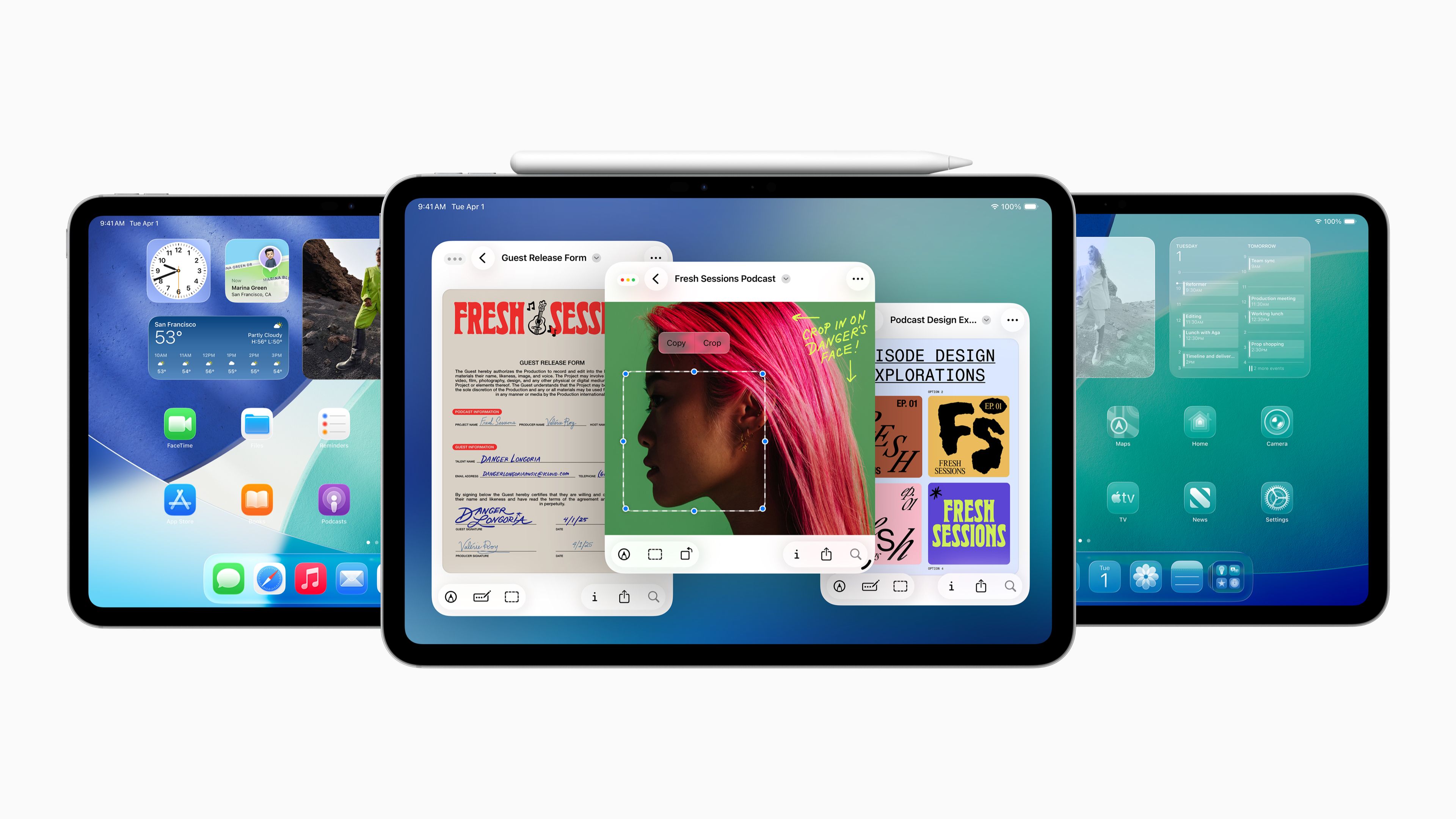
iPadOS 26 takes a leap forward to push the capabilities and versatility of iPad. iPadOS 26 introduces a redesigned windowing system that allows users to freely resize, move, tile, and reopen apps in saved positions, with full support for Stage Manager and external displays.
A new menu bar enables quick access to app commands and search. The Files app gets an updated List view, collapsible folders, folder customisation (colours, icons, emoji), Dock integration, and the option to set default apps by file type.
A new Preview app allows for PDF and image viewing, annotation, and sketching with Apple Pencil. Background Tasks now support long-running processes with Live Activities and an updated API.
Some of the audio improvements include per-app and per-site microphone selection, Voice Isolation, and echo cancellation. Local capture enables high-quality audio/video recording during calls.
The Journal app on iPad will now have multi-journal support, rich media entries, and map-based organisation. Gaming features include the new Apple Games app and Game Overlay for in-game updates, settings, and friend interactions.
The update also adds a reed pen tool for traditional calligraphy using Apple Pencil or touch across supported apps. Calculator supports 3D graphing in Math Notes by interpreting equations with three variables. Notes now allows markdown import/export and supports recording and transcribing Phone app conversations.
macOS Tahoe 26
<figure class="image embed" contenteditable="false" data-id="574397" data-url="https://images.yourstory.com/cs/2/d99b1110116911ed9e63f54395117598/Apple-WWDC25-macOS-Tahoe-26-hero-250609-1749525147848.jpg" data-alt="Apple macOS Tahoe 26" data-caption="
macOS Tahoe 26 introduces a new design, additional Continuity experiences, along with even more features to improve productivity. | Image: Apple
” align=”center”> macOS Tahoe 26 introduces a new design, additional Continuity experiences, along with even more features to improve productivity. | Image: Apple
macOS Tahoe 26 introduces a redesigned interface and enhanced features to boost productivity. The Phone app comes to Mac via Continuity, allowing users to make and receive cellular calls with features like Call Screening and Hold Assist. Live Activities from a nearby iPhone now appear in the Mac menu bar, linking to iPhone Mirroring for interaction.
Spotlight is overhauled with unified search results, better filtering, browse views, and app-integrated actions through App Intents.
Apple Intelligence powers features like Live Translation across Messages, FaceTime, and Phone, and smarter Shortcuts that run automatically or integrate with models for tasks like summarising content. Users can create Genmoji and AI-generated images with more control and personalisation. Reminders are now automatically categorised, and relevant actions can be suggested based on content.
A new Apple Games app centralises gaming, while Game Overlay allows system adjustments and social features without exiting a game. Metal 4 adds advanced rendering tools for developers to enable smoother, faster gaming experiences.
The update also includes a refreshed Safari with floating tabs, improved sidebar, and enhanced fingerprinting protection. Journal debuts on Mac for writing and organising entries, with synced journals and map views. FaceTime adds a revamped UI with Contact Posters and quicker access to SharePlay and Live Translation. Notes supports markdown file import/export and Phone call transcription.
watchOS 26
<figure class="image embed" contenteditable="false" data-id="574398" data-url="https://images.yourstory.com/cs/2/d99b1110116911ed9e63f54395117598/Apple-WWDC25-watchOS-26-hero-250609-1749525216001.jpg" data-alt="Apple, watchOS 26" data-caption="
watchOS 26 offers a new look and even more intelligence for a more personalised experience. | Image: Apple
” align=”center”> watchOS 26 offers a new look and even more intelligence for a more personalised experience. | Image: Apple
watchOS 26 has a new design for a vibrant interface across apps and watch faces.
Workout Buddy uses Apple Intelligence to provide real-time personalised coaching and motivational insights during workouts, analysing data privately and delivering feedback with a dynamic voice. The Workout app’s layout is updated with four new quick-access buttons and integrates music and podcast suggestions tailored to workout types.
The Smart Stack offers improved predictive hints based on user context and routines. Messages supports Live Translation and contextual action suggestions on supported Apple Watch models, plus customisable background and poll responses. Notifications can be dismissed with a wrist flick gesture on newer watches, and speaker volume now automatically adjusts to ambient noise for calls, alerts, and Siri.
The update brings the Notes app to Apple Watch, enabling users to view, pin, unlock, checklist, and create notes via Siri, dictation, or keyboard. The Phone app gets Hold Assist and Call Screening. Live Listen controls now allow users who are deaf or hard of hearing to view real-time captions on Apple Watch and control Live Listen sessions remotely.
The Photos watch face shuffles images based on Featured content for more meaningful moments. The watch face gallery is redesigned on both Apple Watch and iPhone for easier browsing with faces organised into collections.
tvOS 26
<figure class="image embed" contenteditable="false" data-id="574402" data-url="https://images.yourstory.com/cs/2/d99b1110116911ed9e63f54395117598/Apple-WWDC25-tvOS-26-hero-250609-1749525758074.jpg" data-alt="Apple tvOS 26" data-caption="
tvOS 26 brings a vibrant look to Apple TV, delivering a fresh and expressive experience. | Image: Apple
” align=”center”> tvOS 26 brings a vibrant look to Apple TV, delivering a fresh and expressive experience. | Image: Apple
tvOS 26 comes with the Liquid Glass design for a vibrant, reflective interface and enhanced interaction in the Apple TV app. The app now displays more shows and movies with new poster art, and users can choose to automatically show profiles on wake for quicker access to personalised recommendations and playlists.
Sing-along sessions turn iPhones into microphones, with real-time lyrics, translations, and visual effects for group participation. FaceTime on Apple TV gains Contact Posters and expanded Live Captions in six new languages, with on-screen call notifications integrated with HomePod and iPhone.
Additional updates to come include new aerial screensavers from India, customisable screensaver options, and the ability to set any AirPlay speaker as the default audio output.
Other updates
AirPods 4, AirPods 4 with ANC, and AirPods Pro 2 get studio-quality audio recording and camera remote features. Users can capture high-quality vocals on the go, even in noisy environments, with Voice Isolation and beamforming mics powered by the H2 chip.
Call clarity improves across iPhone, iPad, and Mac, supporting apps like FaceTime, Voice Memos, and Webex. Creators can also remotely start or stop video/photo capture by pressing and holding the AirPods stem, enabling hands-free recording with compatible camera apps.
Edited by Megha Reddy
